Collision
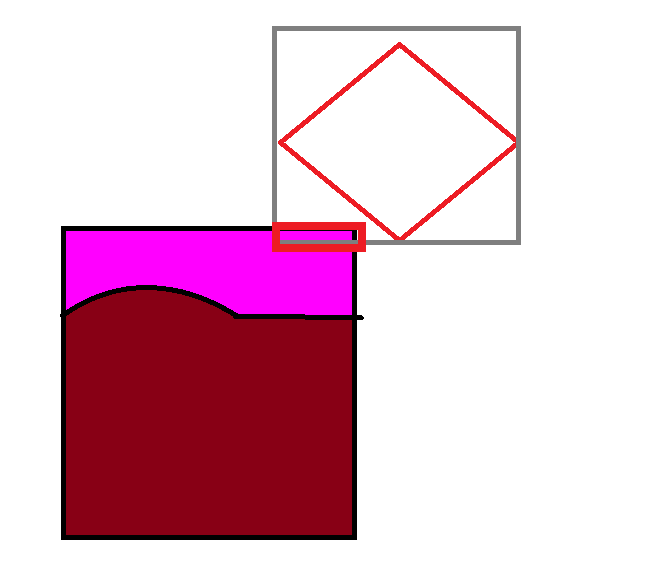
픽셀이 들어왔으면 픽셀을 체크해서 충돌해야되는 부분이라면은 체크를 해야된다.
그전에 사각형 기준으로 충돌이 되었는지 체크를 하는게 좋다.
처음부터 픽셀로 충돌체크하면 굳이 할필요 없는것도 하게되서 자원소모가 크기때문이다.
이후 교집합 삼각형을 구해준다.
float Left = Src.Min.x < Dest.Min.x ? Dest.Min.x : Src.Min.x;
float Right = Src.Max.x > Dest.Max.x ? Dest.Max.x : Src.Max.x;
float Top = Src.Max.y > Dest.Max.y ? Dest.Max.y : Src.Max.y;
float Bottom = Src.Min.y < Dest.Min.y ? Dest.Min.y : Src.Min.y;
픽셀 충돌체의 좌하단 좌표를 구해준다.
Vector2 LeftBottom = Dest.Box.Center - Vector2(Dest.Box.Length[0], Dest.Box.Length[1]);
Length[0]은 x길이의 절반 Length[1]은 y길이의 절반이다.
따로 Center를 중심으로 하고있어서 절반값으로 구해져있다.
x,y값을 빼게되면 좌하단 좌표가 나온다.
좌하단좌표를 빼준다 (0,0좌표로 맞춰준다.)
Left -= LeftBottom.x;
Right -= LeftBottom.x;
Top -= LeftBottom.y;
Bottom -= LeftBottom.y;
0 또는 이상값이 나오면 범위안에 들어가게끔 수정해준다.
Left = Left < 0.f ? 0.f : Left;
Right = Right >= (float)Dest.Width ? (float)Dest.Width - 1 : Right;
Bottom = Bottom < 0.f ? 0.f : Bottom;
Top = Top >= (float)Dest.Height ? (float)Dest.Height - 1 : Top;
비트맵은 불러올때 위아래를 반전시켜서 불러오기때문에 위와 아래를 반전시켜야한다.
for (int y = (int)Top; y < (int)Bottom; ++y)
	{
		for (int x = (int)Left; x <= (int)Right; ++x)
		{
        	//RGBA이므로 4를 곱해준다.
			int	Index = y * (int)Dest.Width * 4 + x * 4;

			switch (Dest.Type)
			{
			case PixelCollision_Type::Color_Ignore:
			{
            	//RGB값이 무시할 색상과 일치한다면 넘긴다.
				if (Dest.Pixel[Index] == Dest.Color[0] &&
					Dest.Pixel[Index + 1] == Dest.Color[1] &&
					Dest.Pixel[Index + 2] == Dest.Color[2])
					continue;

				// 무시할 색상이 아니라면 이 픽셀의 점이 Box2D 안에 들어가는지 판단한다.
				// 픽셀의 월드상에서의 위치를 만들어낸다.
                //위아래가
				Vector2	PixelPos = LeftBottom + Vector2((float)x, (float)Dest.Height - y);

                //거리를 구해서 안에 있을시 히트포인트로 해준다.
				if (CollisionBox2DToPoint(SrcResult, DestResult, Src, PixelPos))
				{
					SrcResult.HitPoint = Vector3(PixelPos.x, PixelPos.y, 0.f);
					DestResult.HitPoint = Vector3(PixelPos.x, PixelPos.y, 0.f);
					return true;
				}
			}
			break;
			case PixelCollision_Type::Color_Confirm:
			{
            	//충돌체크해야될 색상이 아니라면 무시한다.
				if (Dest.Pixel[Index] != Dest.Color[0] ||
					Dest.Pixel[Index + 1] != Dest.Color[1] ||
					Dest.Pixel[Index + 2] != Dest.Color[2])
					continue;

				// 무시할 색상이 아니라면 이 픽셀의 점이 Box2D 안에 들어가는지 판단한다.
				// 픽셀의 월드상에서의 위치를 만들어낸다.
				Vector2	PixelPos = LeftBottom + Vector2((float)x, (float)Dest.Height - y);

				if (CollisionBox2DToPoint(SrcResult, DestResult, Src, PixelPos))
				{
					SrcResult.HitPoint = Vector3(PixelPos.x, PixelPos.y, 0.f);
					DestResult.HitPoint = Vector3(PixelPos.x, PixelPos.y, 0.f);
					return true;
				}
			}
			break;
			case PixelCollision_Type::Alpha_Ignore:
			{
            	//무시할 알파값이면 무시한다.
				if (Dest.Pixel[Index + 3] == Dest.Color[3])
					continue;

				// 무시할 색상이 아니라면 이 픽셀의 점이 Box2D 안에 들어가는지 판단한다.
				// 픽셀의 월드상에서의 위치를 만들어낸다.
				Vector2	PixelPos = LeftBottom + Vector2((float)x, (float)Dest.Height - y);

				if (CollisionBox2DToPoint(SrcResult, DestResult, Src, PixelPos))
				{
					SrcResult.HitPoint = Vector3(PixelPos.x, PixelPos.y, 0.f);
					DestResult.HitPoint = Vector3(PixelPos.x, PixelPos.y, 0.f);
					return true;
				}
			}
			break;
			case PixelCollision_Type::Alpha_Confirm:
			{
            	//무시할 알파값이 아니라면 진행한다.
				if (Dest.Pixel[Index + 3] != Dest.Color[3])
					continue;

				// 무시할 색상이 아니라면 이 픽셀의 점이 Box2D 안에 들어가는지 판단한다.
				// 픽셀의 월드상에서의 위치를 만들어낸다.
				Vector2	PixelPos = LeftBottom + Vector2((float)x, (float)Dest.Height - y);

				if (CollisionBox2DToPoint(SrcResult, DestResult, Src, PixelPos))
				{
					SrcResult.HitPoint = Vector3(PixelPos.x, PixelPos.y, 0.f);
					DestResult.HitPoint = Vector3(PixelPos.x, PixelPos.y, 0.f);
					return true;
				}
			}
			break;
			}
		}
}'공부 > DirectX' 카테고리의 다른 글
| DirectX 레스터라이저 (0) | 2021.08.17 |
|---|---|
| DirectX 스탠실 (3D에만 사용) (0) | 2021.08.17 |
| DirectX 공간분할 (0) | 2021.08.06 |
| DirectX11 카메라 (0) | 2021.08.06 |
| DirectX11 혼합 -알파블렌딩 설정 (0) | 2021.08.04 |
